Thursday, February 19, 2015

Thing 23, The Best for Last!


The Daily Mail

 
I've finally made it! The 23rd Thing.
I feel it's appropriate to end this blog off with a suggestion for my favourite app of all time - my guilty pleasure, my daily escape, my news source and my celebrity gossip updates: The British Newspaper app - The Daily Mail.
 
Ok, ok, there's some trashy content. But there's also a glut of fascinating news, science, and  human interest stories to be had. There are quite literally hundreds of news articles every day, with updates every hour or so. You almost can never read it all. It would take you hours to get through all the content if you wanted -there's the Australian and American news sections, the "Femail" section and the Sports section, plus many more.
 
I can scroll through the different sections, clicking on stories with titles like "LA woman has her 8ft alligator pet seized by cops after claims she was feeding it feral cats after the creature was found surrounded by kitten carcasses"
or
"The evolution of the Oscar dress: From Janet Gaynor's off-the-rack skirt to Jennifer Lawrence in Christian Dior, EVERY gown worn by the best actress winners since 1929 revealed"

I've also found that The Daily Mail has THE most in-depth news articles about all major world events too, with loads of photos. When there was the shooting on Parliment Hill in Ottawa just recently, it was the Daily Mail that had the most information - also being the most accurate and current.
 
I've got both my sister and sister-in-law hooked on the site too. It's such a fun app for browsing heart warming stories, or the latest breaking news, or fun gossipy pictures of Beyonce.
 
And now you know my secret! Daily Mail is the way to go :)
 
 
So to end this blog off, I'd like to say - I've had a ton of fun. I've learned a surprising amount, and I enjoyed doing it. I hope you've enjoyed reading it as well!
 
Sayonara!


Thing 22: Games

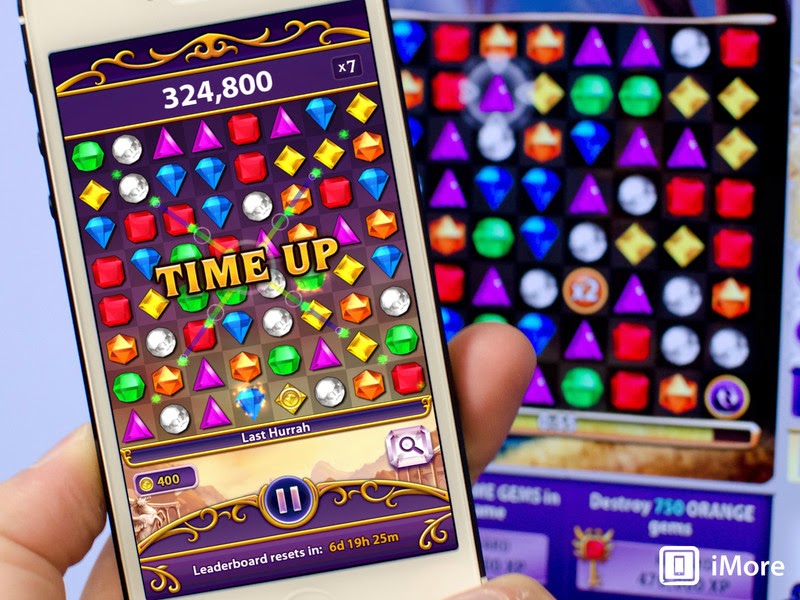
Bejeweled


I was looking at all the games listed and while I recognized a few (Candy Crush, Clash of Clans) - the majority of them didn't sound appealing. So I decided to try out my favourite game, for old times sake. I used to be obsessed with Bejeweled when I was younger (think MSN messenger days) and got a little too good if you know what I mean. Like, I should have been doing something more practical and worthwhile with my life.
 
Turns out that I am still easily addicted to Bejeweled and possibly even more obsessed now that it comes on my beautiful shiny iPhone 6 Plus. I can play it wherever - on the couch, in my room, waiting for an appointment. It's scary how easy it became to just want "one more game". ;)
While playing, I was actually reminded of this meme for Netflix that was eerily similar:


 Alright, so what exactly is Bejeweled? It's a matching game - you group together different coloured jewels to gain points. There are several versions of the game - "Diamond Mine"/ "Lightning Speed" / "Butterflies" and "Zen". All of them are roughly the same amount of addicting I've found. There's also the option to play the "Poker" version but you have to pay for that one, so I avoid it.
To be completely honest, I've earned all the highest badges for the game, except for 3.
 
I would recommend this game as a great escape - and that's all. It's not educational, it's not really strategic in the way that other games are, and it's a game that will bring about long lasting life benefits. But hey, if you've got a couple of minutes to kill at the doctor's office and you can't be bothered to pick up a 2 year old magazine - Bejeweled is your answer!

Friday, February 13, 2015

Thing 21: Hobbies (Food!)

Kraft: iFood Assistant


After looking at the hobby apps suggested for this week I felt like none really interested me in particular.

The closest one to being useful was the food app - which then got me thinking about what food websites I like. I realized that one of my go-to food/recipe websites is the Kraft Canada site (I admit I'm not a real "foodie" - just someone who likes to make simple, quick, cheap and healthy meals at home).

So I decided to download the Kraft app and it blew me away! It is super fun to use and has tons of features.

I was mentioning it to a co-worker at the Langley Library and she exclaimed about how she regularly uses the app and has a friend that loves the "On a Dime" feature - which gives tips for recipes that are cheap.

Although the app relies heavily on Kraft food products, it's still worth downloading in my opinion. You can always subsitute different food items instead of Kraft if you want to make it more organic/gluten free/less sugar/kosher/vegetarian/lactose free.

I think it's neat finding apps like these - ones I can recommend if someone asks what a good app is for ideas for making dinner or appetizers for a Superbowl party.

I like apps that are practical for both my professional life and personal life. Then, when people ask me if I'd personally recommend something, I can answer honestly. Check it out people!

Thursday, February 12, 2015

Education: Thing nineteen

DuoLingo

I was so happy to discover this app! I honestly got a bit obsessed with it actually (my co-workers can attest to my fascination with it).

It's a wonderful app for learning languages and I would highly recommend it to anyone - both personally and professionally.

First off, I liked how it starts you off with a "placement test". The test gives you an idea of your knowledge of the language and what level you can begin with. Even though I thought I had the basics of French down, my test revealed that I needed to start with Level 1.

It then launched me into the Level 1 program and I was immediately addicted. There were photos, quizzes, fill in the blanks, speaking and listening exercises. It was very repetitive and exactly how I'd imagine a strong language learning program would go.

I found myself hooked and kept wanting to "level up". Within half an hour, I'd already finished 4 lessons and was wishing I could do more.

One other useful feature was that I received a 'reminder' email when I hadn't logged in for a couple of days later. It  was a good prompt to bring me back to the app when I didn't have time.

Professionally, I think this app would be a great supplement to our Mango languages that is available through our FVRL database collection.

Personally, I appreciate that this app is free. I think it's awesome that something this well designed and fun to use comes with no charges (as far as I can tell).

Overall, I am delighted in this language learning app!

20 - Managing Your Finances

My Bank's App: Aldergrove Credit Union


Because my little tiny community credit union bank is not listed on any of the money tracking apps, I decided it was a bit useless to download them - with basically no functionality.
Therefore, I thought I'd talk about my experiences with my own bank's app.

To begin with, it's surprisingly user friendly. Maybe that is simply because there aren't too many options as my bank doesn't offer lots of options. It's a great little credit union, with about 5 branches in the Abbotsford/Aldergrove/Langley area.

All the things I need are on the app.
It shows my balance, all my different accounts (TSA Savings, Chequing, Savings, etc), and all my "recent activity" within those accounts.

It also gives the option for paying bills, scheduling regularly paid bills, transfering money into different accounts and more.

It's one of my most used apps as I check it on a regular basis - at least 3 times a week or more. I like how it's updated instantly, as soon as I make any kind of purchase or move my money around. It's detailed, but not overwhelmingly so.

I have always kept a pretty good eye on my money and know quite close to exactly where I stand, so I feel this app fits perfectly with my life. It's not bothersome with pop-ups and constant reminders (but I assume some people would appreciate those kind of features). It's easy to open, it gives me the information I'm looking for, and isn't too slow or cumbersome.

Once I do a joint bank account with my husband at a new bank, I will probably try one of the money management apps, but for now, I'm pleased with my community credit union's app :)

Thursday, January 29, 2015

THING 18- Community Connection App


1. BC Health Services Locator App

After playing around with this app for a couple of minutes I decided it was:
A) super easy to use
B) helpful for finding clinics, especially ones that are open late.

The main reason it is easy to navigate is because there isn't a whole lot of information, but sometimes that is what makes it user friendly and attractive.

I can imagine using it in my personal life, for those times when you're really sick/someone in your family is really sick and you need to get to a walk-in clinic pronto but aren't sure where the nearest one is, and what their hours are.
My favourite part about the app is how they have all the addresses and phone numbers listed - and when you click on the icon for "phone" it immediately dials it for you. I was definitely impressed with that! I hate having to search for phone numbers on Google and then try to memorize it quickly enough to be able to punch it into my keypad.

I put this app right into my "Health" related app category and I think I'll keep it.


2. My Lower Mainland Guide

I like this app! I must say I was pleasantly surprised. It has local deals that I always have fun viewing; it has news that is updated regularly (I admit I like to read local stories about small town issues); and it has a complete listing of places to go out and eat.
The layout isn't bad and the information is detailed and pratical and yet not overwhelming.

In terms of it being used professionally - I'd say probably not.
Personally though, I can see this app coming in handy.

I'm just learning all sorts of new things! :)

Friday, January 23, 2015

17. Audio

SoundCloud


I chose this app for a couple of reasons.
 
1. I had heard about it previously
2. I wanted to check out an app with both music streaming AND voice recording audio capabilities
3. I did a quick review of music/audio recording apps on the internet and SoundCloud had what I was looking for
4. It is free, with no pressure to "upgrade"
5. No ads
 
 
After looking into the app, these are my thoughts:
 
  • I love the "freshness" of it. Soundcloud posts new content all the time, and 'trending' music allows for new discoveries on a regular basis
  • It is pretty easy to navigate. It took me about 3 minutes to figure out where I could upload my own audio, which isn't too bad I guess.
  • I like how many remixes of songs there are - something fun and different
  • I can see myself using this for studying - the categories of music you can select range from rap to ambient to classical.
  • This is not really an app for uploading your own audio on a regular basis - definitely not for creating voice memos, lists and reminders. This app is designed for something like uploading an entire speech or a reading that you wanted to keep.
  • The app is made for those who want to share their audio files
  • I can't really see myself using it professionally, but that's OK

Infographics

Easel.ly


I must admit I don't know a whole lot about infographics. Sure, I've seen them everywhere on the Internet, but I had never tried to create a document using them, or read about their history.

I really liked reading the link posted for today's "Thing". It gave me a great understanding of how they came about, and how infographics are helpful for learning, and for making documents easy to digest.

I decided to go with Easel.ly for no apparent reason, other than the name sounded cool.
I spent about half an hour playing with their site.
I created a fun page called "Redheads vs Blondes".

My feelings about this tool are twofold:

A) it would take a while to get the full functionality of the site mastered

BUT

B) it seems really useful for professional or academic purposes.
I can actually see myself using this for an assignment or a staff presentation when I become a librarian. It's interesting, eye catching, and a great way to sum up complicated information in a one page format.


Here's the link to my partly done infographic:
My Easel.ly

Videos: 15

Vine & Animoto: A Comparison


When I saw the post for today, I knew that I would just have to check out Vine. My husband (and all other men it seems- my brother, guy friends, cousins) love this app and checks it on a semi-regular basis. I've heard a bunch about it, and how some Vine users are hugely popular, with thousands, or millions(!) of people following their video accounts.
A lot of the popularity of Vine comes from the humor involved in the posted videos -6 seconds of silly, stupid, ridiculous, bizarre videos that are often intended to entertain/surprise/disgust.

So I made myself a Vine account and checked it out.

My thoughts: I LOVE it! I can already tell I will be a regular user.  The "Animal" category alone is worth the app - short videos of adorable kittens and puppies and more. The comedy section is good too.

I feel like this app is right up the alley of young people - it captures the attention of those who have the attention of a fly - most 10 year olds to 20something year olds currently.

I see this app being popular if used irreverently by the library - a fun, silly way to gain the interest of young library users. I envision Vine being used by a marketing department or a hip young librarian who knows how to connect with teens.


So, for Animoto, I think this app has an entirely different feel. This app is not one for quick entertainment - it is used for creating 30 second videos that can be shared.

This app is ideal for presentations, assignments, and staff slideshows.

It takes a while to upload, but the functionality of it is pretty good.
I'd recommend it for sure.


Wednesday, January 14, 2015

Thing 14. Presentations.

Prezi.

I'd heard about this from classmates, and wasn't disappointed.
First off, this app is absolutely excellent for creating a professional, high quality looking presentation.
There are multiple formats that you can choose from, which range in detail and colour and number of slides.
I played around with it for a while and was very impressed with the functionality of it. I could add slides, delete slides, add photos, add text, add transitions, add videos and audio. All of this for free!

I think this presentation app is great for both professional and my own school use. I can quickly operate it and add content that makes any topic look good.

Using Prezi makes it seem like you've spent hours creating a fantastic presentation, when really it's already set up and ready for you to insert your own material.

I'd definitely recommend this app for others to use!
(PS you do have to create a Prezi account, and there is somewhat limited functionality compared to the full version which you pay for. I think the free version is good enough, personally).

Thursday, January 8, 2015

Virtual Meetings and Video Chat: Thing 13.

Medeo


For this blog post, I thought I'd switch things up a bit and talk about an app that wasn't suggested on the list.

The video conferencing app that blew me away recently was Medeo, a health care related app. Basically, to sum it up, once you have Medeo on your phone or tablet, you can meet with a doctor anytime, anywhere. It really amazed me the first time I used it. I know that technology is evolving rapidly and that university students are the most likely to be able to adapt and utilize the new methods of communication with few fears and inhibitions (plus the technological capabilities), so it makes sense that my University of BC health care program would support Medeo.

I had a renewal coming up for my asthma inhaler prescription and instead of going to a physical doctor's office, I signed up for a Medeo "appointment".

I'll walk you through how it went on my video conferencing app.

First off, I got a text message, prompting me that my 'appointment' time was about to start.

Once I had logged in with my username and password - which I had created prior to this meeting - I was met with a second message saying that the receptionist would be with me shortly and to not leave my device.

Within a couple of minutes, the video portion of the app came to life, with a nice lady in an office saying, "Hello Claire, welcome to your appointment".

I then started my side of the video conference and had a little introductory chat with the receptionist.

When we were all done, she put me on "hold" - which is essentially a blank screen, until the doctor was ready.

When the doctor was ready at her computer in her office, she started her video and began speaking with me.

After approximately a 2 minute conversation, my prescription was filled and being transmitted to my local pharmacy.

The doctor wished me well and logged out.

It was both bizarre and incredibly useful.
I was sitting in my living room, on my couch, in my old clothes, and had just finished a doctor's appointment.

All I can say is I'm totally in favour for videoconferencing. It's handy, efficient, practical, and useful.

12. Ebook Apps + Zinio


Part I -Overdrive


  • What did you think about the setup experience?

  • Initially, fine. Downloading it, no problem. But when I went to log into my account for the first time, it sent an error message about needing to change my 'cookie' setting. So I followed their link to the 'how to change the settings on iPhone' and the photos displayed in their instructions were
    A) not ones that matched the layout of my phone
    B) not easily figured out.

    SO... I gave up. If it doesn't work pretty easily the first time I upload it, I can't be bothered. I'll try it on my tablet and let you know later.

    Part II- 3M Cloud Library


  • What did you think about the setup experience?

  • Great! Super easy.

  • How easy was it to download content?

  • Very easy. No problems. I specifically chose a really large book - "How to Cook Everything" that has over 1000 pages and it downloaded in maybe 8 to 10 seconds on the FVRL public wifi. I was impressed.

  • What do you think about the options for changing views, fonts, narration speed, and navigating within the books?

  • I liked it. I thought it was fairly intuitive and simple to navigate. The buttons were easy to find

  • Do you think library customers would find this app intuitive? Useful? Fun to use?

  • Yes, Yes, and Yes. I thought it was well designed for a smartphone app and could imagine it would be quite nice on an iPad. I liked the ability of downloading a 1000+ page book on to my handheld device.

  • If you ran into challenges using the app, do you think that the freely available library content is enough of a trade-off to make it worth persevering to use the app?

  • In my opinion, yes. Once you get it to work, the whole world of library material becomes available to you in the palm of your hand, for free. It seems too good to be true. So that's when you realize you have to place holds on new books, etc and you can't get everything you want right away, but hey, it's still worth it.


    Part III - Zinio

    I like Zinio but to be honest, I still like leafing through a physical magazine. I enjoy flipping the pages manually.
    However, I appreciate it for specific articles that I see in the newstands at the grocery store that I'd like to read but I can't be bothered to read the whole magazine.
    For example, this month's Esquire magazine had a fantastic article about space travel and I could easily download the issue and flip directly to the article.
    Worth it for that feature alone.


    Wednesday, January 7, 2015

    Thing Eleven: Library and Ref

    Part I - Mango Languages


    • What did you think about the setup experience?
    Creating a separate account with Mango is always a little tedious but it is worth it, in order to track your progress and save your learning courses. The set up wasn't too bad in comparison with other apps, I didn't mind it.

  • How easy was it to access content?
  • Because my phone runs on the LTE network and is pretty new technology, I had no problem running the software and accessing content. However, if I had an old phone, I would imagine this app would be pretty slow and not run as optimally as it does on mine.
  • Do you think library customers would find this app intuitive? Useful? Fun to use?

  • As far as being being intuitive, I would say it is middle of the road. As for being useful - yes of course! Any learning app that is free and helps language learning is universally useful. Even learning the basics of a language for a trip to Italy for 2 weeks could be worthwhile for a library user. Plus, I recently learned from a co-worker that there is the option to learn English - from a selection of about 12 native languages (French, Polish, Spanish, etc). I can see this being an excellent ESL tool as well.
    As for it being fun to use - it does a pretty good job! It's colourful, interactive, and keeps the user's attention. Not bad for a language app.
  • If you ran into challenges using the app, do you think that the freely available library content is enough of a trade-off to make it worth persevering to use the app?

  • Definitely. People love free stuff and are willing to sit through a couple of minutes when it doesn't upload properly or takes too long or crashes. I know I would persevere myself!

    Part II - VPL & Bibliocommons


  • What options does the library app user have?

  • To search new items, search the entire catalogue, access their account, see suggested materials/recently returned/award winner lists, etc.

  • How far can you get with the app without logging in with a library card?

  • You can search a fair amount for titles and search within lists but in order to place anything on hold or look at your account, you must log in, even while the app is already open.

  • Can you tell how it provides eBook access?

  • From what it seems like, the app is set up with the existing web browser options for downloading eBooks - Overdrive for example. You request a book, it shows you that it's an eBook and you follow the prompts.

  • What do you think of the interface? Would library customers prefer it over the traditional, full-site catalogue or the mobile catalogue FVRL currently offers?

  • Personally, I really liked it, but anything is an improvement on full web formatting being squished onto a mobile device. I always get ticked off when websites I would assume to have a functioning app are still running their website instead. The only thing I didn't like was how the search results were displayed. I typed in "Harry Potter" into the main search bar and over 300 results popped up, with the beginning couple in other languages (Russian or something I guessed). It wasn't perfectly intuitive and only with refining your search significantly (oh and there was no option to refine by language- which seems silly to me - or at least that I could find quickly) can you get at the right material you are looking for.

  • If you had to choose an FVRL app, which one would you like?

  • This one seems good to me, as long as there were some basic modifications. More efficient search results for example.

    Tuesday, December 23, 2014

    Thing 10 Sharing Photos

    As I mentioned in the previous post, I already have Instagram and Snapchat.

    So, I will just state my opinions of these two applications.

    Instagram:

    • Good for instant posts
    • Fun for Throwback Thursdays (posts of old photos from last week to 10 years ago)
    • Increasingly commerical
    • Can discover and creep on literally thousands of people
    • Celebrity accounts can be fun to look at
    • The fashion accounts are interesting to me
    • I keep my followers private
    • searching hastags (#) can be informative and time wasting and amusing all in one
    Snapchat:

    • perfect for sending quick pics to close family and friends
    • very limited to no advertisments
    • not for a broad audience unless you add many people you don't know
    • smaller amount of users than Instagram
    • longer video uploads than Instagram
    • short term appeal vs Instagram that keeps your photos

    OVERALL

    I prefer each app for it's own merit. I like looking at random Instagram accounts for fashion and decorating ideas, and seeing friends' photos of their personal lives.
    I prefer Snapchat for fun, sassy photos that I see for a couple seconds and then forget about.

    I see Instagram as being the photosharing tool that would be applicable for a professional library setting.
    However, if we had a savvy media department that could get Snapchatters to add the library, it would be pretty neat. I doubt that would happen anytime soon though! People like having only their 'real' friends on Snapchat. Snapchat feels like a more intimate app than Instagram.

    Taking and Editing Photos

    I was looking forward to this Thing, and I was not disappointed.

    First off, I had no idea that Photoshop offered a free app version of their product. I have always admired people who have Photoshop skills, as it makes EVERYTHING look better.

    I was stoked to download the app for my own phone.

    I also decided for this Thing that I would show a practical example of what I learned with it.

    I present to you...

    A photo of my lovely, beautiful co-worker at the Walnut Grove library: BEFORE and AFTER PS.

    BEFORE


    AFTER


    Fun!!

    The one thing I couldn't figure out was how to reduce glare, but I think that only comes with the "Premium" version of Photoshop, which you must pay for.

    I can see myself using this app both professionally and personally.

    On a side note: I looked into the Face app, and now I see how all the celebrities do it! My goodness how addicting that would be.


    Alright alright alright.
    I caved.
    Got the Facetune app.


    Social Media Management Tools

    Let me start off with saying, I'm pretty familiar with social media.

    I have (or had at some point in my life) accounts with:

    1. MySpace
    2. Facebook
    3. Google Plus
    4. Instagram
    5. Twitter
    6. Pinterest
    7. Blogspot
    8. YouTube
    9. Flickr
    Therefore, I am pretty compentent with social media. I also learned a whole lot this past year as I did an extensive project for one of MLIS classes, specifically about social media and their privacy policies. After learning about what these organizations can do with your information, it's a little concerning.

    Hence why I deleted my Twitter account, and updated the privacy settings of my other accounts. I think once I become a "real" librarian and have more of a public face, I might go about making my accounts even more private than they currently are. Additionally, I'm not a regular poster on my social media accounts. Once in a while I upload a pic to Instagram and Facebook but other than that (oh and Pinterest I go crazy sometimes) I'm more of a consumer of social media than a 'poster'.

    For this Thing, I decided to download Hootsuite, even though I have little intention of using it.
    I chose this mainly because I have a friend who used to work for Hootsuite and it made me curious what this was all about.

    After going through the app I came to this conclusion: excellent app for a buisness or professional. Also, if you have many social media accounts and you are prolific poster, then again, a huge time saver. It's user friendly, quick and efficient. All very good things in the age of immediacy.

    I would definitely consider using it if I was in charge of social media as a Community Librarian where that was required. I like how your message or photo is automatically distributed.

    Overall, neat app to look into, but not necessarily applicable to my life currently. I prefer to be private.

    Monday, December 22, 2014

    Thing 7: Content Saving and Sharing

    Ok so this one proved to be something new for me, even though I thought I had a handle on all things "cloud" related.

    I already have Pinterest and use it pretty frequently (ok, a bit TOO freqently). I decided to pass on looking into this app more.

    Instead, I decided to research other options for saving info as I wasn't sure which app would be best for that type of thing besides Pinterest. I read several blogs and decided to try Bitly out.

    I downloaded it and was playing around with it and then realized, "gosh" it takes a long time to organize all my favourite links and pages.

    I went back to one of the blogs I was reading and it said this: "I can save way more time by simply Googling whatever favourite thing I want instead of opening 7 folders, all subdivided, with the link to that one article about surfing in Hawaii".

    I agree. Although I am a huge fan of using categorization and organization of your favourite articles and websites, etc., Google is a wizard. A mega fast wizard. And this wizard remembers everything you've ever searched before on your device and can get it up double time if you've searched it previously.


    So there. No content saving and sharing app for me, besides my beloved Pinterest.

    P.S. After posting this "Thing" I Googled myself and found my Pinterest account publicly available, with a plethora of pins and boards I'd made. Not too sure how I feel with my name and image (albeit it's the back of my head) being publicly available. Might make it private shortly.

    Wednesday, December 17, 2014

    Editing and Creating, Post # 6

    When I first started this 23 Mobile Things project, I honestly did not have a lot of faith in how practical and useful it would be.

    I'm already mistaken!

    I downloaded the Microsoft Word Mobile App and was immediately blown away by the functionality. On my iPhone Plus, it is almost like having a full version of Word accessible, anywhere, on the go.

    My goodness why did I not think to download this earlier?! I am in the middle of my MLIS degree and have often worked on assignments frantically as I am commuting in on the skytrain and bus to class. If I had known that I could open my Word documents and edit them straight there, instead of working on them in Google Docs and emailing them to me so I can finish in the computer lab at UBC I could have saved precious time! I was also working on stuff on my Windows Surface and then uploading them to One Drive - this way my saved versions are already complete by the time I get to school and have to print out a copy to hand in.

    Well good thing I discovered this now, instead of at the end of my program. :)

    PS I love the templates in this app - I already opened up one for resumes, and played around with it. It's quite user friendly. Having templates is a perfect option for creating professional looking documents - clean, organized and easy to navigate. I see this being very handy for when I become a real librarian with documents that I will have to create on a regular basis.


    Image from: here

    Tuesday, December 16, 2014

    Notetaking #5

    Thing #5! I'm really rolling along here.

    This one wasn't too hard as I was somewhat familiar with it already - Dragon Dictation that is.

    I used to have this app on my old iPhone 4 (that tiny old thing!) and I remember using it a couple times, and then deleting it because I found it frustrating.

    Turns out, same thing this time around! Surprise, surprise.

    I downloaded it and started off with some pretty simple phrases. I was shortly reminded of how poor it performs compared to Siri.

    I spoke about 6 sentences and it got about 4 of them, all without puncuation. In Siri, she rarely gets it wrong. I guess the difference with this notetaking platform is that it is not personalized to your own voice. Yes, while it is kind of handy to use for your stream of thoughts while driving or without a pen - overall I would give this one a pass.

    I would stick with Evernote. Evernote has so many more functions with a userface that is just more friendly and inviting.

    I understand how Dragon Dictation could be very useful for someone with visual impairments but until the day I can no longer see, I prefer Evernote. And Siri. Because she's so darn cool. (PS Siri knows who is my Mom).

    Zine Thing # 4

    So for this "Thing", I looked through the options of the RSS feeds and decided that Zine would be most applicable to my needs as I have a select few favourite websites - think DailyMail.co.uk/Buzzfeed/Wimp.com/People.com and I wanted to see how Zine would suggest alternative sites based on my constantly updating few favs.

    My first impression of Zine was terrible to be honest.

    It loaded in what appears to be Chinese symbols, with one "suggested" article that seems to be a photo of a dandelion with only Chinese symbols.

    I then tried to find the option for English and was unsuccessful. While playing around, I opened the dictation option, and pressed the microphone. I spoke, and pressed "Done". Only thing - nothing happened. I tried variations of this several times, hitting the microphone twice, double tapping quickly, and nothing. As far as I can tell, it never captured my voice in any format.

    After about 5 minutes of fiddling, I figured I was done. Apps need to be easy to navigate and function intuitively or I'm out within a couple minutes.

    I deleted it and will look into another one shortly. I'll let you know what happens.

    Below is an approximate image of my facial response while trying to figure out Zine.